
Marketing Firms in Boise, Idaho
For web and mobile application companies
Stoltz Marketing Group
Address: 101 S. Capitol Blvd., Suite 900, Boise, ID 83702
Phone Number: 208.388.0766
Website: https://www.stoltzgroup.com/
We help your business get to better through brand building, internal and external communication, and intangible magic.
Services:
- SEO: Yes
- PPC Website Marketing: Yes
CLM Marketing & Advertising
Address: 588 W. Idaho Street, Suite 200, Boise, ID 83702
Phone Number: (208)342-2525
Website: https://clmnorthwest.com/
Compete and win. Again and again. You never stop #winning because we never stop learning.
Services:
- SEO: Yes
- PPC Website Marketing: Yes
c308 Marketing
Address: 1404 W. Idaho Street, Suite 103 Boise, ID 83702
Phone Number: (208) 286-3380
Website: https://www.c308.com/
We build and maintain virtual assets that positively impact the real world.
Services:
- SEO: Yes
- PPC Website Marketing: Yes
Bear Fox Marketing
Address: 6225 N. Meeker Place, Suite 250 Boise, Idaho 83713
Phone Number: (208) 820-1932
Website: https://bearfoxmarketing.com/
If you are a business-to-business company wanting to get the biggest bang for your marketing investments, we recommend you start with our ‘Rankings to Revenue’ SEO strategy.
Services:
- SEO: Yes
- PPC Website Marketing: Yes
WebMarkets
Address: 999 W Main St 200 Boise, Idaho 83702
Phone Number: (208) 514-1634
Website: https://webmarketsonline.com/
Creating unique competitive advantages to sustain long term profits. Expert digital marketing strategies to improve brand awareness, lead generation, and growth.
Services:
- SEO: Yes
- PPC Website Marketing: Yes
116 & West
Address: 805 W. Idaho St. Ste. 300, Boise, ID 83702
Phone Number: 208.472.2129
Website: https://116andwest.com/
New Clients Page: Contact Us
Your adventure awaits. Let’s go. We’re your travel buddy, tour guide, and pilot all rolled into one.
Services:
- SEO: Yes
- PPC Website Marketing: Yes
BrandCraft
Address: 223 N 6th St Ste 50, Boise, ID 83702
Phone Number: (208) 343-1664
Website: https://brandcraft.com/
New Clients Page: Contact
Motivated to grow? Let’s work together. We provide creative services and marketing lead generation.
Services:
- SEO: Yes
- PPC Website Marketing: Yes
What is a user story?
User stories are a valuable tool for capturing software requirements in an easily understandable format. They help communicate the needs and expectations of users, allowing software developers to deliver targeted solutions. Here’s a description of how to format a user story and what should be included:
Format: A user story typically follows a simple template known as the “As a, I want, so that” format:
“As a {type of user}, I want {a feature or functionality} so that {a reason or benefit}.”
Components:
- Role/Persona: The user story begins by identifying the type of user or persona for whom the feature is intended. It provides context about the specific user or group of users who will benefit from the feature.
- Feature/Functionality: This part describes the desired feature or functionality in clear and concise terms. It should focus on what the user wants to accomplish or the problem they need to solve.
- Reason/Benefit: The reason or benefit section explains why the user wants the feature or functionality. It provides insight into the underlying motivation or desired outcome.
Example: As an online shopper, I want to view my order history so that I can track my previous purchases and quickly reorder items.
In this example, the user story identifies the persona (online shopper), the desired feature (view order history), and the reason/benefit (tracking previous purchases and reordering items).
Tips for Writing Effective User Stories:
- Keep it concise: User stories should be brief and focused. Avoid including technical details or implementation specifics. They should capture the “what” and “why,” leaving the “how” to the development team.
- Use a common language: User stories should be understandable to both technical and non-technical stakeholders. Avoid using jargon or technical terms that might confuse or exclude others.
- Collaborate and iterate: User stories are not set in stone. They should be a collaborative effort between stakeholders, product owners, and developers. Refine and iterate on user stories as you gain a deeper understanding of the user’s needs.
Using user stories can help transition to a more structured and effective way of describing software requirements.
Array



Are Apps Stored on a SIM card? (Original)

If you clear your SIM card storage or remove your SIM card, will your app be removed as well? We provide the answer below.
When you activated your phone at your local authorized dealer you probably watched them place a SIM card into your phone. It looks a lot like a MicroSD card doesn’t it? So it’s no wonder people think that is the source of their phone’s storage.
Your phone’s storage is actually internal and is on the phone itself by default. Your downloaded apps and your favorite games are not stored on your SIM card.
There is an option to store your apps on an SD card but it has to be developer enabled. They may or may not want you to have their app on an external device.
Then why do you have one right? The SIM card provides a way for your cell provider to track your usage as well as store your user information for an easy transition when you upgrade or replace a cellular device.
You can rest assured that your SIM card will not remove your precious apps from your phone if it is taken out of your phone unless you transferred the developer enabled ones.
Most likely, however, you won’t be able to place a call (other than to 911) without it. In this case, your phone becomes much more like an iPod Touch as opposed to an actual phone. Although there third party apps such as WhatsApp that allow to call via mobile app.
So go ahead and remove your SIM card if you like. (Hint: It’s easiest with a paperclip)

Where Is Mobile App Data Stored?
Are your apps stored on a sim card? A microSD card? Internal storage? On the cloud? We answer this question below.
Note: This is an expanded/enhanced article of “Are Apps Stored on my SIM card?” If you prefer to read the original article, click here.
To make a long story short, the data that makes an app: video, audio, and music files, documents, downloaded content, and user accounts can be stored in a number of locations. It depends on the app itself, the amount of storage the app requires, how often the app updates, and the settings on your mobile device to where the app and subsequent files are stored. In this article, we will clarify where app data for a mobile device is stored.
This article goes through the following and describes whether app data is stored there and how:
MicroSD Cards
A MicroSD Card is a type of removable flash memory card that is used for storing data, pictures, music, and video. They are used in many devices including smartphones, tablets, digital cameras, and video cameras.
MicroSD Cards are tiny, usually about 15mmx11mm X 1mm, which is about the size of a thumbnail. When used, they are placed directly inside the device, usually in a slot labeled “microSD”. The microSD card can then be easily removed and replaced if needed.
A microSD card stores data in the form of binary code, and a single microSD card can vary greatly in storage capacity, from 2GB to over 1TB. As technology continues to improve, this storage capacity is likely to increase as well.
MicroSD cards can store app data including game data, downloaded content, and user accounts. Most devices with microSD cards are able to automatically detect and save app info to the microSD card, but, in some cases depending on the device, you have to enable this feature. Additionally, some apps require that you manually select the microSD card as the location to save app info.
It’s worth noting that not all smart phones are equipped with ports for microSD cards, Some of the newer models of iPhones as well as some flagship Android models no longer have microSD ports. Instead, they have larger internal storage and rely on cloud storage to back up data should it become necessary.

A MicroSD Card
SIM Cards
A SIM card (Subscriber Identity Module) is about the same size as a microSD card and is also placed inside of a mobile device, usually by the smartphone dealer when the phone is taken in to be activated. Due to these similarities, many are under the misconception that the SIM card can also save app information and, should the card be removed, they would lose that information.
A sim card does not store app data or any type of personal information. It does store the user’s phone number, network authorization data, and text messages. It allows users to switch their service provider by transferring their information to a new SIM card. It also allows users to transmit data and send voice calls and receive calls from other people through their phone.
Another common misconception about SIM cards is that a cell phone will not work if a SIM card is not in place. This is not true. Without a SIM card, you will not be able to place calls or send messages, but a phone can still pick up a wi-fi signal and most of its other features will still function.
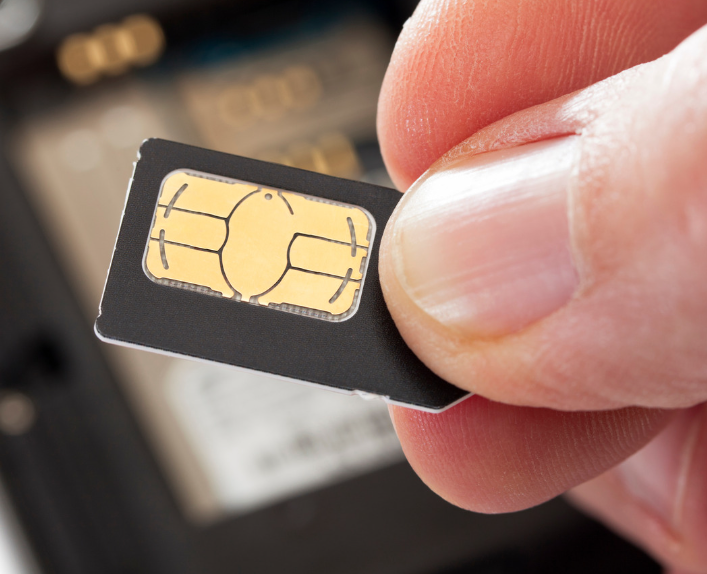
A SIM Card
Internal storage
If you are downloading an app on your phone, the most likely place for the app info to go is to the phone’s internal memory. Generally, when you download an app, it will be stored in a specific folder on the device itself.
This folder is usually referred to as the “Applications” folder. Once the app is installed, you can access it by opening that folder and tapping on the icon of the app. From there, you can change many of the app’s settings as well as disable it or uninstall it.
As of this writing, the standard amount of internal storage for an iPhone or Android is 128GB with up to 1TB available. With that amount of storage now available on mobile devices and even more expected in the near future, some devices have chosen to forego the microSD card slot.
If a phone now risks running low on internal storage, such items as pictures and videos can be transferred to cloud storage. Cloud storage is considered by many to be much more reliable than microSD cards or older methods of portable memory.
Cloud Storage
Cloud storage is a component of cloud computing and is the practice of storing data in a remote, online location instead of a physical storage device. Cloud storage works by transferring data from a user’s computer or smart device to a remote server, usually via the internet. This keeps data safe from many computer breaches since the data is not stored on a device.
The data is then stored in a server which is owned and maintained by a cloud storage provider. The data is securely backed up on the server and users can access it from any device with an internet connection. Google offers Google Drive, which is is one option for free cloud storage and cloud backup.
SaaS business software is typically stored on the cloud. This gives users great computing ability without taking up any internal storage on their computer or devices. Such SaaS software frequently offers exceptional collaboration tools for teams to use. In addition, users can access the software and their information from anywhere, making it extremely convenient. Some business software such as Google Drive and Microsoft Office 365 allow you to store files on the cloud and also download them to your device when needed.
Generally, apps that require more storage space such as large file sharing or audio/video streaming apps will be stored more on the cloud than other types of apps. Additionally, apps that require frequent updates such as messaging, social media, and gaming apps will also be stored on the cloud to ensure that users are able to access the latest version of the app without as many crashes or downtimes.
Apps that require more computing power and require complex calculations also tend to be stored on the cloud to ensure that users have access to the highest level of computing power available.
Apps that are stored on the cloud tend to be much more scalable. Being on the cloud allows an app to handle large amounts of data and traffic and tackle sudden spikes in user demand.
Matraex is a premier app and software development company located in southwest Idaho. Our mission is to answer business and consumer questions regarding app and software development so they can make the best decisions for their circumstances.
We hope that you will look through our content for answers. We would also love the chance to answer your questions directly. Feel free to contact us, call us at (208) 344-1115, or leave a question on our Google Business Profile. We look forward to hearing from you.
Sign up to receive answers to your questions delivered directly to your inbox!
ArraySMTP on AWS SES – Limit IP Addresses – Best Practice (Original)
If you are here – it is likely because your SMTP Credentials have already be compromised and you dont want it to happen again, or you have excellent instincts and are planning ahead.
Below you will see how to limit your SMTP Credentials on SES to only your IP Addresses.
Of course follow the basics of credentials and passwords
- Un guessable
- Dont reuse
- Dont share
- Rotate
When it comes to AWS – SES SMTP Credentials – the ones often used in code and programmatically – the thought may be to set it and forget it. Here is a best practice in those situations to only allow sending from your networks and futher lock down the use of these (or any other) IAM SMTP users.
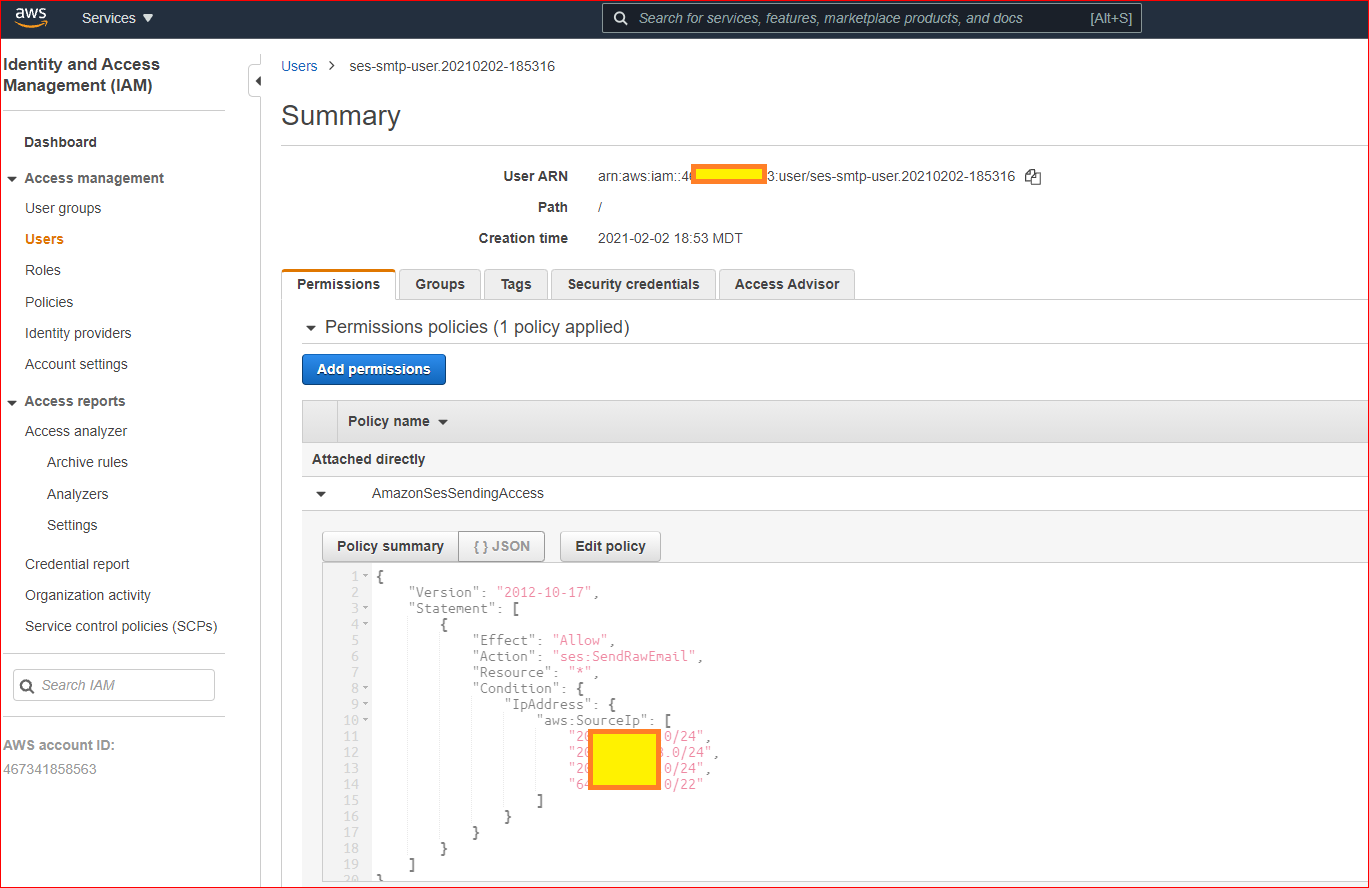
Setup an IPAddress Condition which restricts sending to only your Allowed IP Address(es)
Here is how to do it in the AWS Console
- Goto IAM > Users
- Select [user]
- Go to the Permissions tab
- click the arrow to expand the AmazonSesSendingAccess
- Click Edit Policy
- Update the JSON to add the Condition:IPAddress (below) for the IP Addresses you want to restrict to
Here is an example of my full policy with multiple allowed IP Addresses.
{
“Version”: “2012-10-17”
“Statement”: [
{
“Effect”: “Allow”,
“Action”: “ses:SendRawEmail”,
“Resource”: “*”,
“Condition”: {
“IpAddress”: {
“aws:SourceIp”: [
“xx.yy.zz.0/24”,
“xx.zz.yy.0/22”
]
}
}
}
]
}
Here is a screen shot to help show exactly what it looks like in the AWS Console as it is now.
So then, go do it! https://console.aws.amazon.com/iam/home
This condition can be applied to many of your other IAM users too.
04
Prevent 75% of visitors from google analytics
Lorem ipsum dolor sit amet, consectetur adipisicing elit, sed do eiusmod tempor incididunt ut labore et dolore magna aliqua.
04
Prevent 75% of visitors from google analytics
Lorem ipsum dolor sit amet, consectetur adipisicing elit, sed do eiusmod tempor incididunt ut labore et dolore magna aliqua.
04
Prevent 75% of visitors from google analytics
Lorem ipsum dolor sit amet, consectetur adipisicing elit, sed do eiusmod tempor incididunt ut labore et dolore magna aliqua.
04
Prevent 75% of visitors from google analytics
Lorem ipsum dolor sit amet, consectetur adipisicing elit, sed do eiusmod tempor incididunt ut labore et dolore magna aliqua.
04
Prevent 75% of visitors from google analytics
Lorem ipsum dolor sit amet, consectetur adipisicing elit, sed do eiusmod tempor incididunt ut labore et dolore magna aliqua.
04
Prevent 75% of visitors from google analytics
Lorem ipsum dolor sit amet, consectetur adipisicing elit, sed do eiusmod tempor incididunt ut labore et dolore magna aliqua.