
This article is enhanced from the original “SMTP on AWS SES – Limit IP Addresses – Best Practice”. If you would prefer to view the original article, click here.
If you’re a business using a website or app that uses Amazon Web Service’s (AWS) Simple Email Service (SES,) there’s nothing worse than losing your Simple Mail Transfer Protocol (SMTP) credentials and not being able to send emails from your account. There are simple things that you can put in place, however, that could protect your SMTP credentials and prevent that from happening. These include the following:
This article will answer the following questions:
Your SMTP credentials can be compromised for any number of reasons:
Strong passwords can go a long way to keeping your SMTP account and the personal information of your users safe. Commonly recommended guidelines for password creation for both you and your users, that could be criteria for setting up passwords on your opt in form, can include the following:
In addition to yourself, you should set higher password standards for your users. For more helpful tips regarding passwords and password security, check out “As an App Founder, What Do I Need to Know about Passwords?”
One way to protect your SMTP credentials from being compromised is to reduce the number of IP addresses that can send email from your credentials. This involves allowing the sending of email from your networks and the networks of anyone you deem as necessary, and then locking down any other Identity and Access Management (IAM) SMTP users.
You do that by setting up an IPAddress Condition which will restrict sending of email to only your Allowed IP Addresses.
Here is how to do it in the AWS Console, which can be found at https://console.aws.amazon.com/iam/home. The console will look similar to this:
(With AWS constantly in transition, your page could differ slightly from the below pictures.)
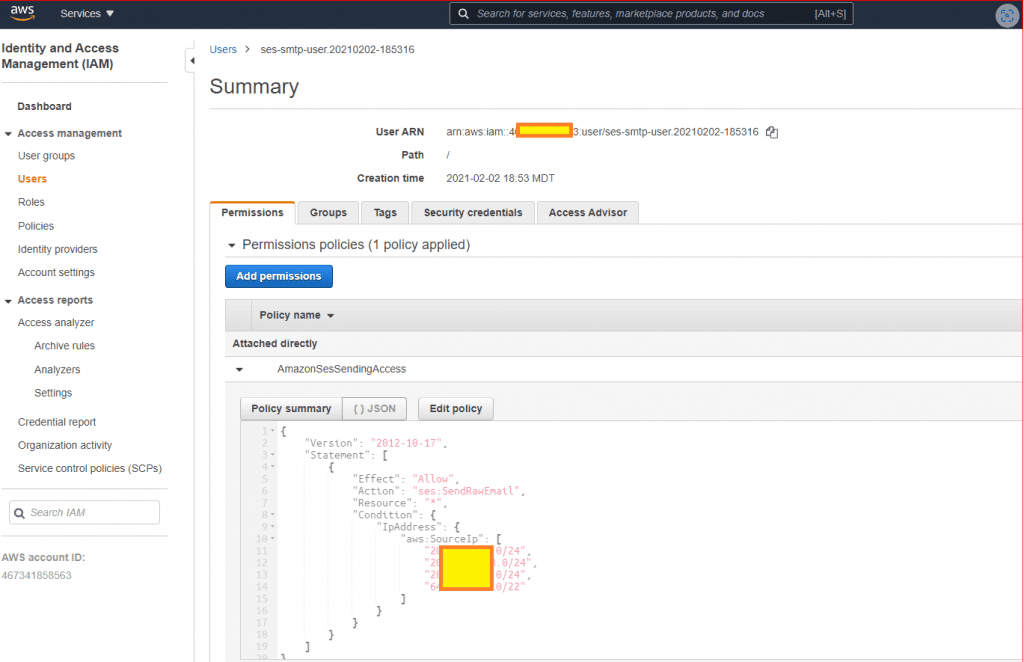
Once you bring up your AWS Console, follow these directions:
Here is an example of a full policy with multiple allowed IP Addresses:
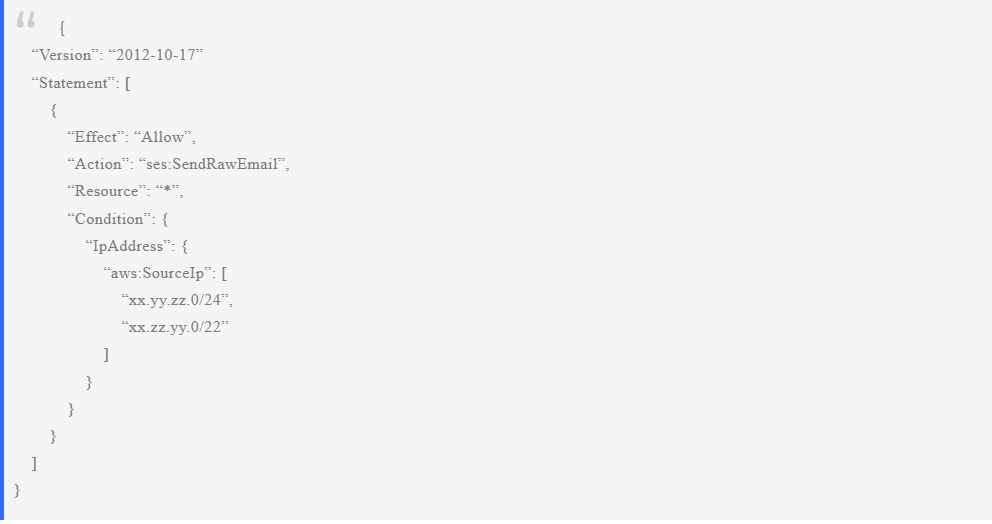
This condition can be applied to many of your other IAM users as well.
If your website or app allows users to set up free accounts with email access, they could take advantage of it. Your website visitors could use email to spam or to send out malicious emails. They could even use your credentials to set up marketing campaigns. These actions could compromise your SMTP credentials. AWS could even remove your credentials which would prohibit you from sending email to anyone.
One possible way to prevent this from happening is by limiting the amount of emails that a guest can send from their account. In addition, you can choose to be notified when a visitor is getting close to reaching that limit. When you are notified, you can confirm what the questionable emails say, determine what is going on, and intervene if necessary.
One possible way of limiting the number of emails that guests can send is to use Amazon Simple Notification Service (SNS). SNS is an API that allows applications to receive notifications from other applications and can, in turn, send out notifications.
To set this up, the app founder will need to create the Amazon SNS topic (similar to an email list) and subscribe it to an email address. Once the topic is set up, the app founder can use the AWS SES API to configure a “sending quota” for a guest account. This quota will determine how many emails the guest account can send in a given time period.
If the guest account reaches the quota, the app founder will be notified via the Amazon SNS topic subscription. With this set up, the app founder can be alerted when a guest account is close to its quota so they can take any necessary steps to prevent the account from exceeding the quota.
Amazon may charge for this service, and it is only one way to potentially put limits on emails sent from guest accounts. This may be a topic to discuss with the app developer or to do further research in.
Matraex is a premier app development company located in Boise, Idaho. Our mission is to provide consumers with information about app and software development so they can be informed and make the right decisions for their business. Feel free to call us at (208) 344-1115, contact us, or leave a question on our Google Business Profile. We look forward to hearing from you.
Matraex builds custom web and mobile applications. Our team of professionals can drive development of your app from vision to reality.
Boise, Idaho
Based in the cloud